
See exactly where you rank on Google Maps
Map-based geo grid scanning shows your local search visibility across an entire area — not just from one point. Know where you're winning and where you're invisible.
The problem
You search your own business name and it shows up. Great. But what about someone searching from 5km away? Or on the other side of town? Local search results change based on where the searcher is standing. You have no idea where you're visible — and where you're not.
The solution
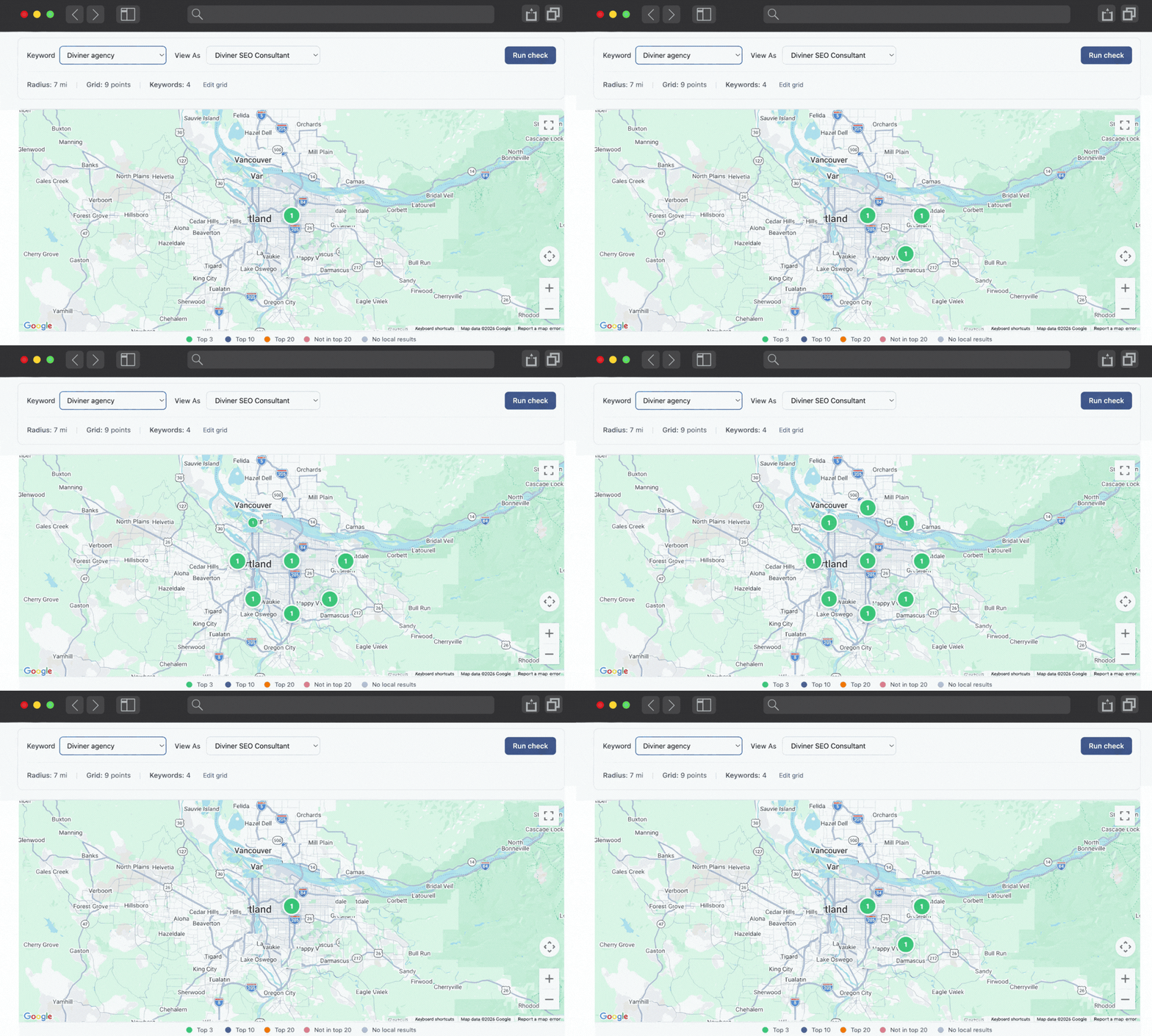
Local Grid Tracking scans Google Maps from dozens of points across your service area and shows you a color-coded map of your visibility. Green squares mean you're ranking. Red squares mean you're not. Now you know exactly where to focus your local SEO efforts.
How it works
Choose your keyword and location
Enter the search term you want to track (e.g., 'emergency plumber') and set the center point for your grid — usually your business address.
Configure your grid
Choose grid size and radius. A 7x7 grid covering a 10km radius is a popular starting point. More grid points = more detail, but uses more credits.
Run the scan
Diviner One checks Google Maps results from each grid point, simulating what a searcher at that location would see. Results come back in minutes.
Analyze and act
View your color-coded grid overlay on a map. Green means you rank well. Red means you don't. Use that data to focus your local SEO efforts where they'll make the biggest difference.
Your visibility, mapped
Local SEO with spatial intelligence
Stop guessing. Start seeing exactly where your customers can find you — and where they can't.
Pinpoint visibility gaps
See exactly which grid squares your business ranks well in — and which ones you're invisible. No more guessing where your local SEO efforts should focus.
Track progress over time
Run scans weekly or monthly and compare results. Watch your visibility grow as your SEO and review strategy takes effect.
Outsmart local competitors
See where competitors rank higher than you on the map. Use that data to target specific areas with reviews, content, and Google Business Profile optimization.
Connects to your keyword concepts
Local Grid Tracking integrates with Keyword Concepts so you can see map visibility alongside search rankings and AI mentions. One unified picture.
Frequently asked questions
- It simulates Google Maps searches from multiple points across a geographic area. For each point, it checks where your business ranks in the local results. The result is a color-coded grid overlaid on a map showing your visibility across the area.
- Yes. Each grid scan uses credits based on the number of grid points. A 5x5 grid uses 25 credits, a 7x7 uses 49, and so on. You can run scans as often as your credit balance allows.
- Regular rank tracking shows where you rank for a keyword from one location. Local Grid Tracking shows where you rank across an entire area. For local businesses, this spatial view is far more useful because customers search from different parts of your service area.
- Weekly or bi-weekly is ideal for active local SEO campaigns. Monthly is fine if you're just monitoring. The key is consistency — running scans at regular intervals lets you see trends and measure the impact of your efforts.
How does local grid tracking work?
Does this use credits?
How is this different from regular rank tracking?
How often should I run scans?
Map your local visibility
See where you rank across your entire service area. Your first geo grid scan is a few clicks away.